
Student taking notes with a laptop and a notebook in a library

Researching a topic with TubExperto: say what you want to learn and get a video path with timestamps

5 min read

How to use Research in TubExperto: write a topic and get an ordered path of YouTube videos, with the reason for each one and the minutes to jump to.

by TubExperto Team

Table of contents
  1. What it solves
  2. How it works
  3. What you can do with the path
  4. Three uses
  5. Where you launch it
  6. What it costs
  7. How long it takes
  8. What it does not do
  9. Where to go next
  10. Frequently asked questions

You want to understand something you do not know yet, say how index funds work, and you open YouTube. Hundreds of videos come up: some are for beginners, others assume you already know, some are advertising under another name and there is no order. You spend an hour choosing and five minutes learning.

Research is the TubExperto piece for that moment. You write the topic in your own words and it returns a path: the best videos, ordered in sections, with the reason for each one and the minute to start from. This guide explains how it is used on each surface, what it costs and what it does not do.

What it solves

When the topic is new to you, your problem is not asking, it is not knowing which channels are worth it. Asking a channel works when you already have the expert; Research is for when you do not yet know who has the answer.
How it works

  1. You write a topic, as you would tell a friend.
  2. YouTube is searched. Several searches on the topic, starting with the TubExperto catalog.
  3. The best videos are chosen. Weak candidates are discarded and the transcripts of the most promising ones are read.
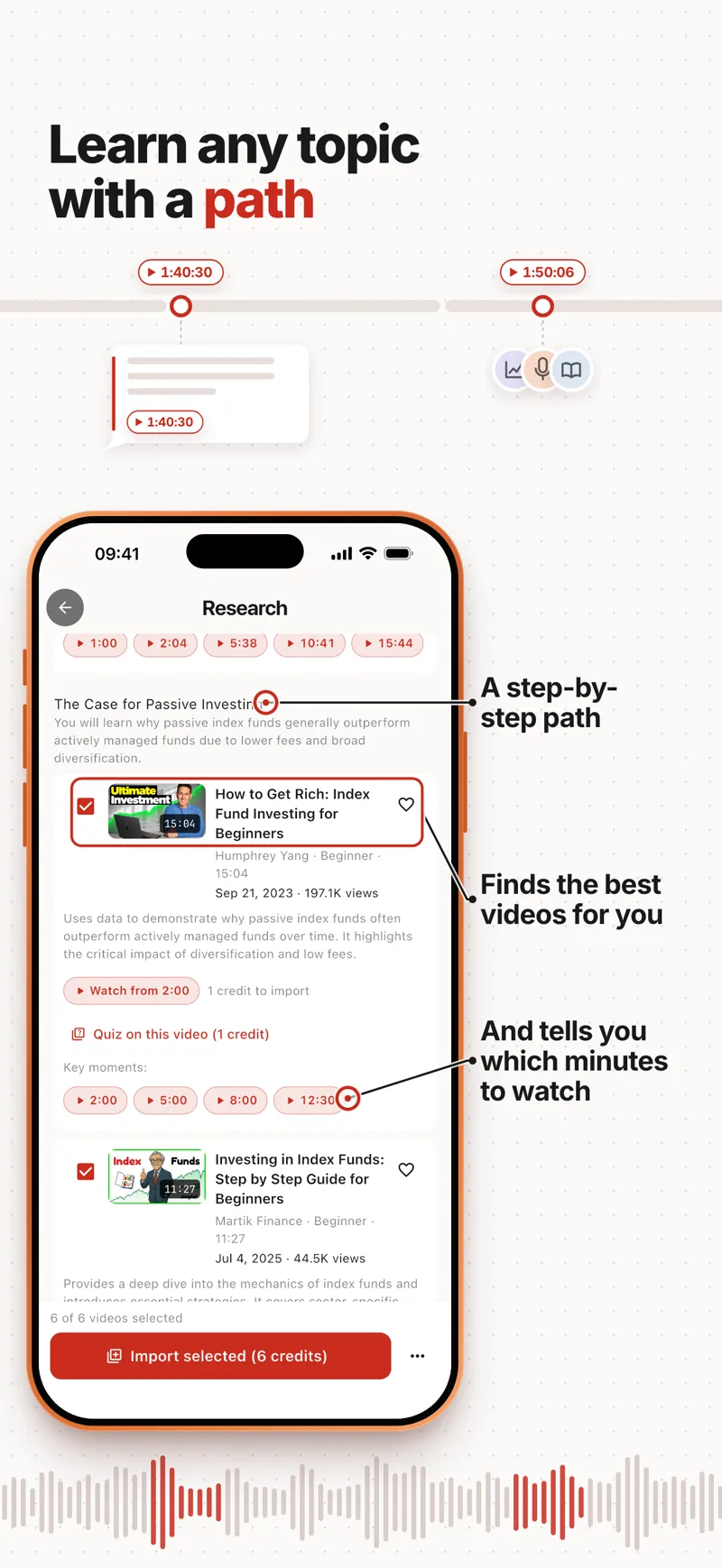
  4. You get the path. The videos are ordered in sections, each with its goal, the reason for each video, the level, the estimated minutes and the key moments to jump to.

The Research screen of the TubExperto app with a path about index funds: sections, chosen videos, a button to watch from a minute and key moments
Real screenshot of the app: a research about index funds. Every video carries the reason it is there and its key moments.

What you can do with the path

  • Watch from the minute that matters. Every video has its "Watch from" button and its key moments.
  • Keep asking. You ask about what it found and get answers citing the minute of the video.
  • Check that you kept what matters. A quiz, for the whole path or for a single video (in the screenshot, one video's quiz costs 1 credit).
  • Follow the channels that appeared in the path with one click, so you do not miss what they publish next.
  • Import the chosen videos to your library to question them directly (in the screenshot, 5 videos cost 5 credits).
  • Export the report as Markdown, PDF or Word.

Three uses

  1. Learn. A progressive path to master the topic from scratch.
  2. Answer a question. A written answer with citations to the exact minute of each video.
  3. Analyse a competitor. An X-ray: you give it a brand or describe your product.

Where you launch it

  • On the web, from the Research section of the panel.
  • In the app, with the Research screen in the screenshot.
  • Over WhatsApp: a topic in one sentence, it shows you the price, you tap "Yes, launch" and it pings you when the path is ready.
  • From your AI assistant with TubExperto Link, which can also keep asking about a finished research.

What it costs

Depth Videos in the path Credits What for
Quick 5 to 8 2 A first look
Standard 8 to 12 4 Balance between coverage and time
Deep 12 to 20 8 A wide sweep for big topics
  • The free plan (Explorer) includes up to 2 researches every 7 days, quick depth only. Standard and deep are for paid plans.
  • If a research fails or you cancel it, the credits are refunded, once and automatically.
  • From WhatsApp or your AI assistant, asking more about a finished research spends no new credits: it reads the videos you already paid for. Importing new videos to go deeper does cost, and it tells you first.
  • Over WhatsApp, before spending anything it tells you the price and only launches when you answer yes.

How long it takes

The product estimates about 5 minutes for quick, 8 for standard and 15 for deep. They are estimates: depending on load it can take longer, which is why it alerts you when it finishes.

What it does not do

  • It does not replace the videos: it takes you to them with the minute.
  • It gives you no sources you cannot open: every item in the path is a YouTube video with its link.
  • It does not guarantee the best video on your topic is in the path: it picks among the candidates it finds, depending on the depth.

Where to go next

Frequently asked questions

Can I research without paying?

Yes: the Explorer plan includes up to 2 researches every 7 days with the quick depth.

What if I do not like the result?

If it fails or you cancel it, the credits are refunded. You can launch another with the topic rephrased.

Do I have to import all the videos?

No. You can watch any video of the path from its minute without importing it. Importing is only needed to question them directly.

Share:

Ready to transform how you consume YouTube?

Turn any channel into your personal AI expert. Precise answers in seconds.

Start free with full Pro access

Keep reading