Connect your AI with a single address
Paste it into the connectors of Claude, ChatGPT, Cursor or VS Code, sign in with your TubExperto account and your AI can query your YouTube channels. No JSON, no keys and no tokens.
https://mcp.tubexperto.comGuides checked against each client’s official documentation on October 29, 2026.
Three steps, once
- 1
Copy the address
It is the same for everyone: https://mcp.tubexperto.com.
- 2
Paste it into your AI
In Claude: Customize, Connectors, "Add custom connector". Elsewhere, in its connectors or MCP servers screen.
- 3
Sign in and authorize
TubExperto opens: you log in, check where access returns to and click "Authorize".
The connector is stored on your AI account: in Claude you add it once on the web or the desktop app and it shows up on mobile too.
Per-platform guides
Each client’s menus, as its documentation describes them today.
Claude+
Signing in happens inside Claude: it detects our OAuth and you just log in with your TubExperto account. No token to copy or store.
- 1Open claude.ai in a browser, click your name at the bottom left and go to "Customize".
- 2Open "Connectors", click "+ Add" and then "Add custom connector". Name it TubExperto, paste the connector URL and click "Add".
- 3Claude detects our OAuth: sign in with your TubExperto account when prompted. The connector is stored on your account, so it shows up on iPhone, Android and the desktop app with nothing else to do. To check it worked, ask "What experts do I have on TubExperto?".
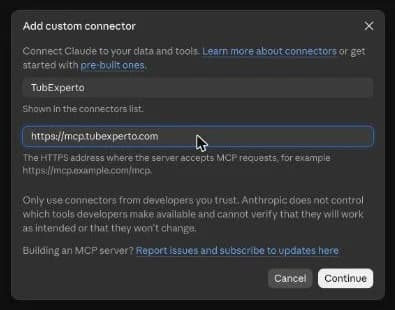
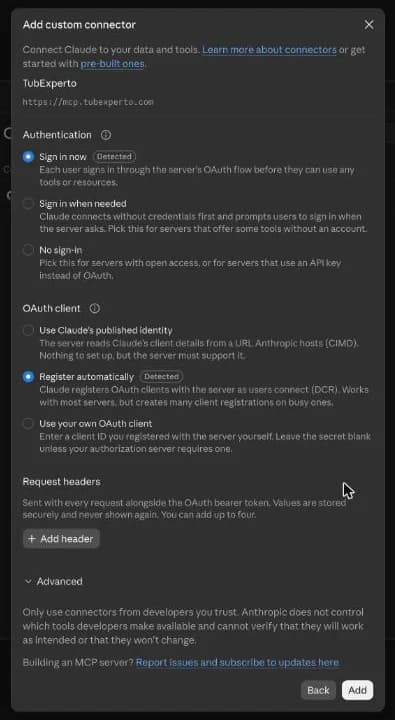
You set this up once, in a browser, at claude.ai. The connector lives on your account, not on the device: once added it works the same in the iPhone, Android and desktop apps, with no per-device setup. Claude's free plan fits one custom connector; Pro and Max state no limit.
Claude works on every one of its plans, the free one included. It works the same on the web, the desktop app and mobile (iOS and Android).
ChatGPT+
ChatGPT uses the same sign-in as Claude: when you create the connector TubExperto opens, you log in with your account and authorize. No token to copy.
- 1Open chatgpt.com in a browser and go to "Plugins" (formerly "Apps & Connectors").
- 2Click "+" and then "Add custom MCP server". Name it TubExperto and paste the connector URL.
- 3Pick OAuth authentication, accept ChatGPT’s warning, log in with your TubExperto account and click "Authorize". To check it worked, ask "What experts do I have on TubExperto?".
Heads up: this can only be set up in a browser, at chatgpt.com. ChatGPT’s iPhone, Android and desktop apps have no screen for adding MCP servers, so do not look for it there. Set it up once in the browser and you can then use it from your phone.
OpenAI keeps custom MCP servers to some plans (Business, Enterprise and Edu, and Pro with limits) and they may depend on your workspace settings. If your plan does not allow it, Claude works on all of its plans, the free one included.
Claude Code+
Claude Code signs in to TubExperto through the browser (OAuth): the command carries no token.
- 1Open the terminal in the project where you want to use it.
- 2Paste the command below. Add --scope user to make it available in every project.
- 3Inside Claude Code type /mcp, pick tubexperto and sign in with your TubExperto account in the browser. Then ask "What experts do I have on TubExperto?".
claude mcp add --transport http tubexperto https://mcp.tubexperto.com
You set this up in your terminal with one command. Nothing to enable on the web or on mobile.
You need the Claude Code CLI installed and signed in. It also works in the desktop app, on claude.ai/code and in the VS Code and JetBrains extensions. If the command fails, create a .mcp.json at the project root with the same block.
Cursor+
The install button carries no token: Cursor opens the TubExperto sign-in the first time it queries the server.
- 1Click "Install in Cursor". Your browser asks for permission to open Cursor, and Cursor asks you to confirm the server.
- 2If nothing happens, Cursor is not installed on this machine: copy the block below and paste it into ~/.cursor/mcp.json. If the file already existed, add the "tubexperto" key inside "mcpServers" without deleting the rest.
- 3Sign in with your TubExperto account when Cursor asks, then ask "What experts do I have on TubExperto?".
{
  "mcpServers": {
    "tubexperto": {
      "type": "http",
      "url": "https://mcp.tubexperto.com"
    }
  }
}
You set this up on your own machine, in Cursor's config file. Nothing to enable on the web or on mobile.
Cursor has to be installed on the machine you click from, because the link opens the application. With no Cursor in front of you, the way in is copying the JSON block into ~/.cursor/mcp.json.
VS Code+
The install button carries no token: VS Code opens the TubExperto sign-in the first time it queries the server.
- 1Click "Install in VS Code". Your browser asks for permission to open VS Code, and the editor asks you to confirm the server.
- 2If nothing happens, VS Code is not installed on this machine: copy the block below and paste it into .vscode/mcp.json inside your project. Note that VS Code calls "servers" what Cursor calls "mcpServers".
- 3Open the chat in agent mode, check that TubExperto shows up in the tool list and ask "What experts do I have on TubExperto?".
{
  "servers": {
    "tubexperto": {
      "type": "http",
      "url": "https://mcp.tubexperto.com"
    }
  }
}
You set this up on your own machine, in VS Code's config file. Nothing to enable on the web or on mobile.
You need VS Code with agent mode chat available, and the editor installed on the machine you click the button from. The same block works for a whole project (.vscode/mcp.json) or for your user profile.
Gemini+
Gemini CLI
Add the server with this command, then type /mcp auth tubexperto to sign in with your account in the browser:
gemini mcp add --transport http tubexperto https://mcp.tubexperto.com
Gemini app
The Gemini app allows custom apps by address only on the web, with a personal account, in the United States and in English. Outside those conditions you cannot add your own connector; Claude works on all of its plans.
Grok+
Grok’s web and apps do not let you add your own MCP connectors. If you use Grok, we recommend Claude, which supports connectors on every plan.
What each plan includes
TubExperto Link works with a TubExperto account, the free one included.
Explorer account
- 1 active connection
- Every connector tool; the ones that spend credits use your credits, as on the web
- Panel and comparison of up to 2 experts, 2 a week
Paid plans
- Panels of up to 3 experts on Pro and 5 on Max, with 30 and 80 a month
- Several connections at once (2 on Pro, 3 on Max): Claude, Cursor, VS Code...
- Research at every depth and without the 2 every 7 days cap
What if I cancel? Your connection is not revoked: it keeps working with the Explorer plan tools. Full access returns when you reactivate your subscription.
Available tools
What your AI can do with your experts. The ones that spend credits do so exactly as on the web.
47 tools. Each one declares its title and whether it is read-only or changes data; your AI asks for confirmation before the ones that spend credits, delete or publish.
- Search Knowledge Base
query_knowledge_baseSpends creditsAnswers a question by searching ALL the user's experts (YouTube channels), or only those in `expertIds` (2+ channels, e.g. to compare perspectives). Costs 2 credits.
- Ask an Expert
query_expertSpends creditsAsk a question to ONE specific YouTube expert/channel, e.g. "what does midudev say about X?". Costs 1 credit.
- My Experts
list_my_expertsRead-onlyList the user's TubExperto experts/channels. Free.
- Get Expert Info
get_expert_infoRead-onlyDetails of one expert: topics, description, subscribers, recent videos.
- Search My Experts
search_my_expertsRead-onlySearch the user's experts by keyword or topic, e.g. "do I have an expert on X?". Free.
- List Expert Videos
list_videosRead-onlyList the videos of one expert/channel, paginated. Free.
- Suggest Channels
suggest_channelsRead-onlyDiscover YouTube channels on a topic the user has not added yet, also when a query over their experts finds nothing. The topic can be in any language (matched by meaning). Free.
- Recommend Videos
recommend_videosRead-onlyThe most viewed videos of the channels the user follows. Free.
- Search Experts
list_expertsRead-onlySearch the shared TubExperto catalog for experts by topic or category, to discover them before adding. Free.
- Get Latest Videos
get_latest_videosRead-onlyThe most recent videos of a YouTube channel/expert. Free.
- Get Video Transcript
get_transcriptRead-onlyFull transcript of a video. Formats: "chunks" (default, semantic blocks with timestamps), "full_text" (plain, no timestamps), "segments" (raw cues). Long transcripts come in parts: the footer says "Ask for part: N"; call again with that part. Free (0 credits).
- Get Video Summary
get_video_summarySpends creditsSummary of a video with chapters, key topics and timestamps. Costs 2 credits.
- Expert Panel
query_expert_panelSpends creditsAsk 2-5 experts the same question and get their INDEPENDENT full answers side by side. For one structured comparison use compare_experts. Costs 1 credit per expert.
- Compare Experts
compare_expertsSpends creditsAnalyze how 2-5 experts cover a topic and return ONE structured synthesis: agreements, disagreements, unique perspectives, coverage depth. For each expert's separate answer use query_expert_panel. Costs 1 credit per expert.
- Ask across loose videos
query_video_batchSpends creditsAsk ONE question across 2-8 loose YouTube videos, WITHOUT creating an expert/channel. Each video must already be indexed (lazy_index_video or import_videos first). Claims are cited with video and timestamp. Costs 1 credit per video.
- Find Best Expert
find_best_expert_for_topicRead-onlyFind the best expert for a topic: checks the user's library first, else recommends public catalog experts with a deep link to the filtered catalog. The topic can be in any language. Free.
- Get Video Chapters
get_chaptersRead-onlyChapter list of a video with timestamps and deep links (cached, no AI cost). Free.
- Plan & balance
tubexperto_balanceRead-onlyThe user's plan, monthly credit balance, credits used this period and active MCP limits. Free, consumes no credits.
- Founder status
founder_statusRead-onlyThe user's status in the TubExperto founders programme (by invitation): founder profile, free plan and until when, partner commission and whether it is active, referral link, and progress on the "while you collaborate" commitment (days with activity and feedback against the minimums, deadline). Free, read-only; says so if the user is not a founder.
- Due reviews
get_due_reviewsRead-onlySpaced-repetition (SM-2) quiz questions due now, plus a summary (total cards, due, streak, per-expert breakdown). Read-only: grades and reschedules nothing. Free.
- Search Videos
search_videosRead-onlySearch videos on a topic across THREE scopes: the user's experts (free), the shared catalog (free) and/or YouTube globally (not yet indexed); default `auto` blends all three. Returns a numbered list with a `searchId` that `import_videos` can reference. Pass `channelId` to search INSIDE one YouTube channel, indexed or not (each result says whether it is imported and what importing costs); with `channelId` and no `topic` it lists the channel's latest uploads. Free.
- Import Videos
import_videosSpends creditsImport videos into the user's library, by `{searchId, indices[]}` (list from `search_videos`) or `{videoIds[]}`. Videos already in the shared catalog are instant and free; brand-new ones cost 1 credit each and are queued for processing. Max 10 per call. The channel must already be an expert: `subscribe_to_channel` first if needed.
- Get Import Status
get_import_statusRead-onlyPoll imports started with `import_videos` or `subscribe_to_channel`, by `jobIds[]` or `videoIds[]`. Returns stage progress and per-job `capabilities`: `queryable` (query_expert works), `summarizable` (get_video_summary works). Poll until `allReady: true` to query, `allSummarizable: true` before summaries. Free.
- Search Channels
search_channelsRead-onlySearch YouTube channels on a topic, blending the TubExperto catalog (subscribing is free) and YouTube globally. Returns a numbered list plus a `searchId` for `subscribe_to_channel`. Free.
- Subscribe to Channel
subscribe_to_channelAdds dataAdd a YouTube channel to the library as an expert, by `{channelId}` (UC… or @handle), `{channelUrl}` or `{searchId, index}`. Subscribing costs 0 credits, but a BRAND-NEW channel takes one expert slot of the plan; importing videos later costs 1 credit per new video. The response returns `cost` and `expertSlots`: tell the user before importing. Channels other users imported get instant access; new ones are created with the N most recent videos preselected.
- List Channel Uploads
list_channel_uploadsRead-onlyList the full chronological uploads of ONE YouTube channel by `{channelId}`, `{channelUrl}` or `{expertId}`. Returns a numbered list plus a reusable `searchId` for `import_videos {searchId, indices}`. For "the whole channel" rather than a topic search. Max 200. Free.
- Index a video on demand
lazy_index_videoSpends creditsTranscript/info of ONE YouTube video by URL or ID even if its channel is NOT indexed. Two steps: call WITHOUT confirm to learn the cost (1 credit for a brand-new video; free for Shorts), which charges nothing; call with confirm:true to get the RAW transcript at once and start full channel indexing in the background. For videos already in the library use get_transcript.
- Research a Topic
start_topic_researchSpends creditsStart an open YouTube investigation on a topic when the user does not know which channel to ask. It plans queries, discovers candidate videos, READS their transcripts and returns a curated learning path (sections in teaching order, each video with why, level and which minutes to watch). Asynchronous: returns a `researchId` and the path is ready in 90-300 s; poll get_topic_research every 15-30 s. Costs by depth: quick 2, standard 4, deep 8 credits, refunded in full if it fails or is cancelled. Free plans: only `quick`, twice per rolling week.
- Get Topic Research
get_topic_researchRead-onlyCheck a research started with start_topic_research. While running: `status`, pipeline `stage`, `progress`, `estimatedSecondsRemaining` (poll every 15-30 s). When completed: the curated path, a ready-to-present Markdown rendering, the `conversationId` of its thread and `nextSteps` (import cost, followable channels). Then answer follow-ups with continue_topic_research (free) instead of researching again.
- Continue Research
continue_topic_researchAdds dataAsk a follow-up about a FINISHED topic research, answered from the transcripts and pages it read, with `[videoId@mm:ss]` citations to the exact second; it remembers earlier turns. FREE: no credits, cheaper than a second research. If the answer needs more of a video than was sampled, it returns `needsImport` with the import cost: say the cost and ask before import_topic_research_videos. The turn is saved in the research conversation (`conversationId`), visible on the website.
- List Topic Researches
list_topic_researchRead-onlyList the user's topic researches, newest first: topic, goal, depth, status, path title when finished, and the `conversationId` of its thread (null = no follow-up asked yet). Free.
- Cancel Topic Research
cancel_topic_researchDeletes or revokesCancel a running topic research (credits refunded in full) or delete a finished one (removes it and its path for good; videos already imported stay in the library). The response says which happened. Free.
- Import Research Videos
import_topic_research_videosSpends creditsImport the videos of a finished research into the library so query_knowledge_base can use them. `videoIds` picks some; omit it for the whole path. Costs 1 credit per brand-new video, 0 for those already in the shared catalog: ALWAYS state the cost (in get_topic_research nextSteps) and get the user's agreement first. Channels not yet experts are subscribed automatically (one expert slot each); a channel without a slot sends its videos to `skipped[]`, the rest still import.
- Follow Research Channels
follow_topic_research_channelsAdds dataFollow channels from a topic research as experts (only channels of that research). Free, but each new channel takes one expert slot; without a slot it returns in `skipped[]`. Catalog channels are followed at once (`followed[]`); unindexed ones are queued (`queued[]` with an `importJobId`; poll `get_import_status`). Following adds the channel, importing adds the path's videos. Ask the user before calling.
- Research Quiz
generate_topic_research_quizSpends creditsCosts 1 credit. Quiz on a topic research to check what the user retained; nothing needs importing (built from what the research read and any stored transcripts). `videoId` quizzes one video of the path; omit for the whole route. Runs in the background: the first call answers `queued`, ready in 1-2 minutes; call again to collect it (free, never charged twice). Refunded if generation fails.
- Export Research Report
export_topic_researchRead-onlyExport the report of a finished research (overview, numbered path with link and reason per video, answer or competitor analysis, channels, gaps). `md` (default) returns Markdown inline; `pdf` and `docx` return a download link. Free.
- List Topic Watches
list_topic_watchesRead-onlyList the user's topic watches (each scans new uploads of the channels they follow and alerts on a topic match): id, topic, whether active, delivery (`instant` or `daily`), last scan. Free.
- Create Topic Watch
create_topic_watchAdds dataCreate a topic watch: every 2 hours, new uploads of the channels the user follows are scored against `query` and relevant ones become alerts with a 2-3 line reason and the exact minute. Write `query` as a rich description (3-300 characters: subject, words a video would use, competitors or names). `digestFrequency`: `instant` (default; urgent alerts by email at once, rest in the daily digest) or `daily`. Max 10 per user. Free (cost capped by TubExperto, no credits). Ask the user before creating one.
- Topic Watch Alerts
get_topic_watch_alertsRead-onlyAlerts of ALL the user's topic watches since a moment (default last 24 h), newest first: video and channel, watch topic, score, `urgent` (worth interrupting now; the rest belongs in a daily digest), 2-3 line reason, matching minute and `url` pointing at it. Also the month spend against the monthly cap. Free.
- Ask My TubExperto Conversations
ask_tubexperto_conversationsRead-onlySearches the conversations stored in TubExperto (not Claude's or any assistant's own chat history or memory): chats the user had in TubExperto with their channels, videos, panels and researches, on the website, app or these tools. Answers with numbered citations to each conversation, e.g. "what did I ask TubExperto about X?", "did I already research Z?". For what a CHANNEL says about a topic use query_knowledge_base. Hybrid search (meaning + exact words). Free; the free plan gets 5 a day.
- Export to Notes (Obsidian, Notion, Markdown)
export_conversationAdds dataExport a conversation (or one answer) as a note: `markdown`, `obsidian` (YAML frontmatter, questions as callouts) or `notion` (Notion-ready Markdown). Citations become links to the YouTube video at that second, plus a sources list per answer. Returned inline; with `destination: "notion"` it is created as a page in the user's connected Notion (else the Markdown is returned). Without `conversationId` it exports the latest MCP conversation. Free.
- My Public Links
list_public_linksRead-onlyList the user's active public links with their URL, visits and shareId. Free.
- Revoke Public Link
revoke_public_linkDeletes or revokesRevoke one of the user's public links: the page stops working immediately. Free.
- Search My Library
searchRead-onlySearch the videos in your TubExperto library by keywords in title or transcript. Returns JSON `results` (id, title, url); pass an id to `fetch`. Free.
- Read Video from My Library
fetchRead-onlyRead a library video by the id `search` returned. Returns JSON id, title, text (transcript), url. A long transcript comes in parts: the footer of `text` says which `part` to ask for next. Free; each part counts against the same daily limit as `get_transcript`.
- Help
helpRead-onlyShow what you can do with TubExperto. Free.
Which tool is available in which plan
This comes from the same table the server enforces: what you see here is what happens when a tool is called.
| Tool | Explorer | Paid |
|---|---|---|
list_my_expertsList your experts | ||
query_expertAsk an expert | ||
get_expert_infoGet expert info | ||
search_my_expertsSearch your experts | ||
list_expertsPublic catalog | ||
list_videosList expert videos | Limited | |
helpContextual help | ||
query_knowledge_baseSearch across all channels | ||
query_expert_panelMulti-expert panel | ||
compare_expertsCompare 2-5 experts (synthesis) | ||
get_video_summaryVideo summary with chapters | ||
get_transcriptFull transcript | ||
get_latest_videosLatest uploaded videos | Limited | |
recommend_videosAI recommendations | ||
suggest_channelsDiscover new channels | ||
start_topic_researchResearch a topic with no channels | Limited | |
get_topic_researchCheck the research | ||
list_topic_researchList your researches | ||
cancel_topic_researchCancel or delete a research | ||
import_topic_research_videosImport the videos of the path | ||
follow_topic_research_channelsFollow the channels of the path | ||
generate_topic_research_quizQuiz on the path or on one video | ||
export_topic_researchReport as Markdown, PDF or DOCX |
"Limited" means the Explorer plan can use it within an allowance: researching a topic, quick depth only and twice every 7 days; listing videos and the latest ones, with fewer results; asking your conversations, with a daily maximum.
How we protect your account
- Only people with a TubExperto account who sign in get through: OAuth 2.1 with PKCE, the same standard Claude and ChatGPT use.
- There are no keys or tokens to copy, paste or store in the browser: the AI gets its access directly when you authorize.
- The authorization screen tells you which domain the access returns to before you click "Authorize".
- You see every connection in your dashboard (TubExperto Link) and revoke it with one click.
- There are usage limits per account, per IP address and per tool, and AI tools spend your plan credits as on the web.
Troubleshooting
My AI does not see the TubExperto tools+
Check that the connector is enabled in the conversation (in Claude, the "+" button and then "Connectors"). If you just added it, open a new conversation.
It says authorization failed or expired+
Remove the connector and add it again with the same address: the sign-in opens again. In your dashboard, under TubExperto Link, you can revoke old connections.
It says I reached the connection limit+
Each plan allows a number of active connections at once. Revoke the one you no longer use in your dashboard (TubExperto Link) and authorize again.
The AI says there are no experts or cannot find my channels+
Check that you have at least one expert on TubExperto and that its videos are indexed. If they are still processing, wait for them to finish before asking.
Usage Examples
Query your knowledge base
“What do my experts say about the best investment strategies in 2026?”
Uses query_knowledge_base: searches all your channels at once and returns answers with cited sources (channel, video, timestamp).
Expert panel
“What do midudev and Fireship think about the future of React Server Components?”
Uses query_expert_panel: asks 2-5 experts the same question simultaneously, like a debate panel.
Compare experts (synthesis)
“Compare midudev and Fireship on React Server Components: where do they agree and where do they disagree?”
Uses compare_experts: returns ONE synthesis with agreements, disagreements and unique angles across 2-5 experts. Different from query_expert_panel, which shows each expert's full answer.
Discover recent content
“What has Veritasium uploaded recently? Summarize their latest video.”
Uses get_latest_videos + get_video_summary: finds recent videos and generates a summary with chapters and timestamps.
Ready to connect your AI?
Your dashboard shows the address, each client’s guide and your active connections.
Go to TubExperto Link